Does not apply
Universal Laptop Dock UD 3900 Dual HDMI USB C/USB 3.0 Ethernet 6 USB Mac/Win
Universal Laptop Dock UD 3900 Dual HDMI USB C/USB 3.0 Ethernet 6 USB Mac/Win
Couldn't load pickup availability
CHASE PARKER ENTERPRISES
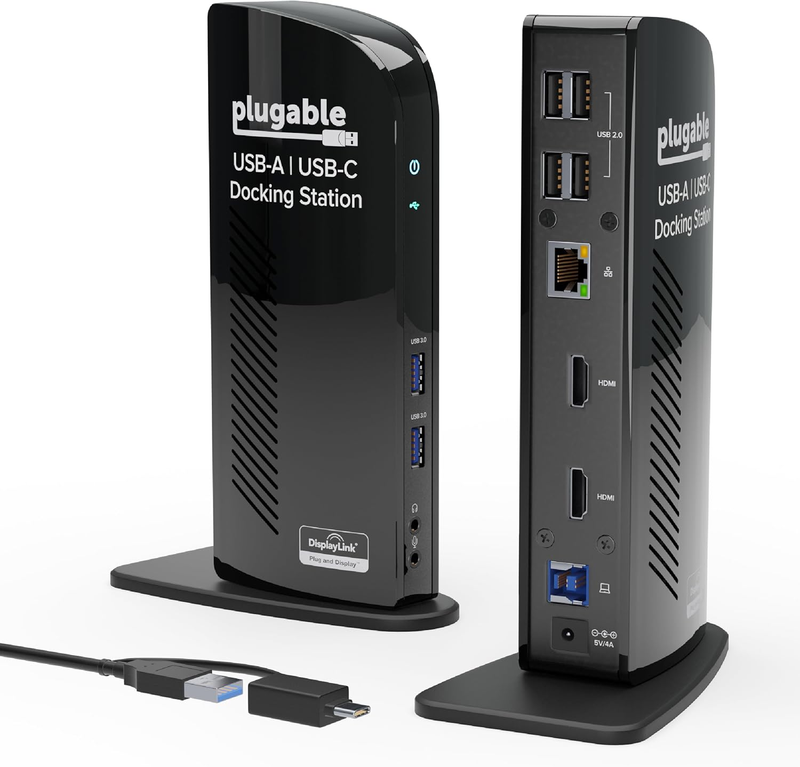
- Flexible Expandability: Featuring a hybrid 2-in-1 USB 3.0 and USB-C cable, a single connection from a host PC to this USB dock provides: 2x HDMI video outputs, wired Gigabit Ethernet, 3.5 mm Headphone and Microphone jacks, 2x USB 3.0 ports, 4x USB 2.0 ports. TAA-compliant.
- Dual HD Monitors (Driver Required): Supports dual HDMI displays up to 1920x1200 @ 60Hz. A single HDMI display can reach 2560x1440 @ 50Hz. 4K not supported.
- Universal Compatibility: Windows 11, 10, 8.x and 7 with plug-and-play driver installation via Windows Update. For macOS 10.14 or later, a manual DisplayLink driver installation is required (instructions included), while ChromeOS 100 or later works without additional setup. Not compatible with Linux/Unix systems.
- For Best Results: Ideal for web and productivity software usage. Not recommended for gaming. Does not support some non-DisplayLink adapters, DisplayPort connections or HDCP protected content. This USB docking station does not charge the host laptop.
- 2-Year Coverage, Lifetime Support: Every Plugable product, including this docking station, is covered against defects for 2 years and comes with lifetime support. If you ever have questions, contact our North American-based team - even before purchase
Product description
-
Spectre, ProBook, Dell Latitude, Dell XPS, Lenovo ThinkPad, Lenovo Yoga
-
With Driver Installation
MacBook Air, MacBook Pro, iMac (incl base M1, M2, M3, M4, M5, and all Pro/Max series)
*macOS 10.14+
-
Asus CX1 x360 Acer C936 Lenovo IdeaPad Slim *ChromeOS 100.x+
-
Connect up to 2x displays at up to 1920x1080 @ 60Hz
-
This dock does not provide laptop charging
How to Install Driver of macOS
Note - macOS requires ‘Screen Recording’ permission for the DisplayLink software to work. Granting this permission enables sending data from your computer over USB to the HDMI outputs. No data, images, or pixels are being stored or recorded.
Installing DisplayLink Manager on macOS
Merchant Video-
Will this docking station (UD-3900) work with my computer?
Modern computers running Windows, macOS, or ChromeOS with an available USB-A or USB-C port are compatible with the UD-3900 docking station.
-
Do I need to install software or drivers in order to use the UD-3900 docking station?
Yes. A DisplayLink driver is needed for Windows and macOS to enable displays (auto-install on Windows, manual on Mac). On macOS, 'Screen Recording' allows the driver to send display data via USB, enabling external displays; no data is stored.
-
Is this docking station compatible with M1 / M2 / M3 / M4 /M5 Mac laptops?
Yes. All Apple Mac laptops with M1 / M2 / M3 / M4 / M5 processors that are running macOS 11 or later are compatible with a DisplayLink Manager App installation (see video above)
-
Are my monitors compatible with the UD-3900 docking station?
Ensure your monitors support both up to 1920x1200 resolution and a 60Hz refresh rate, and are equipped with HDMI video input ports. No 4K or support for DisplayPort.
-
Does the UD-3900 charge my computer?
No, the UD-3900 does not charge the host computer. You must connect an external power source to the computer in order to charge while using the UD-3900.
Plugable Docking Stations
|
Customer Reviews
|
4.5 out of 5 stars 11,749
|
4.5 out of 5 stars 1,882
|
4.3 out of 5 stars 1,656
|
4.2 out of 5 stars 1,755
|
4.2 out of 5 stars 438
|
|
Price
|
$99.95$99.95 | $73.95$73.95 | $129.95$129.95 | $229.95$229.95 | $269.95$269.95 |
|
Maximum number of displays
|
2 | 2 | 2 | 3 | 4 |
|
Video Ports
|
2x HDMI | 1x HDMI 1.3, 1x DVI | 2x HDMI 2.0 or DisplayPort 1.2 | 3x HDMI 2.0 or DisplayPort 1.2 | 2x DisplayPort, 2x HDMI |
|
Max Resolutions Supported
|
2x 1920x1200 @ 60Hz | 2x 1920x1200 @ 60Hz | 2x 4K @ 60Hz | 3x 4K @ 60Hz | 4x 4K @ 60Hz (Windows only) |
|
# of USB Ports
|
6 | 6 | 6 | 5 | 7 |
|
USB Port Specifications
|
2x USB 3.0, 4x USB 2.0 | 2x USB 3.0, 4x USB 2.0 | 6x USB 3.0 | 1x USB-C, 4x USB 3.0 | 1x USB-C,1x USB 2.0,5x USB 3.0 |
|
Laptop Charging
|
No | No | No | Yes - 100W (96W Certified) | Yes - 100W (98W Certified) |
|
Laptop Connection
|
USB 3.0,USB4,USB-C,Thunderbolt | USB 3.0,USB4,USB-C,Thunderbolt | USB 3.0,USB4,USB-C,Thunderbolt | USB4, TB4/3, USB-C | USB4, TB4/3, USB-C |
Share